


Digital Memorial Slideshow Creation Tips for a Legacy That Lives
Written with AI assistance under our editorial guidelines
Digital memorial slideshows transform remembrance by making memories accessible worldwide through a single click, allowing anyone to contribute or view regardless of location. Unlike traditional photo albums, they enable creative storytelling through video, music, and interactive elements, creating living monuments that connect distant families and honor legacies in ways that transcend time and distance.
The digital memorial slideshow isn’t just a modern convenience—it’s a battleground for memory, emotion, and legacy. Most tributes drift by in a haze of nostalgia, generic music, and cookie-cutter templates, leaving viewers with little more than a polite sigh. If you’ve searched for digital memorial slideshow creation tips, you’re probably looking to do better—to craft something raw, resonant, and unforgettable. This isn’t about ticking boxes or following tired formulas. It’s about building a living monument—one that refuses to fade or become background noise. With over 66% of the global population online as of 2024 (DataReportal, 2024), boundaries have shattered: distance, time, and even death itself can’t stop us from remembering together. But in this new era, the line between genuine tribute and digital noise is razor-thin. Let’s cross that line on purpose.
Why digital memorial slideshows matter more than ever
The evolution from photo albums to digital legacies
It’s impossible to overstate the emotional shift from the dusty photo album—pulled from a high shelf, the pages yellowed, the plastic covers crinkled—to the luminous glow of a digital memorial slideshow. Gone are the days when memories could only be relived by those present in the living room; now, a single click bridges continents, generations, and even the silence of loss.

Technology hasn’t just made remembrance more accessible; it’s rewritten the rules of who gets to participate, how stories are told, and what legacy means. Digital memorial slideshows are now central to funerals, anniversaries, and even spontaneous moments of collective grief. Their advantages run deeper than convenience:
- Radical accessibility: Anyone, anywhere, can contribute or view—no travel, no logistics, no exclusion.
- Shareability: Memories outlive the event, passed on through links and clouds, not just word of mouth.
- Creative storytelling: Video, music, voice, and interactive elements let you paint with an emotional palette, not just brushstrokes of nostalgia.
Cultural acceptance has followed suit. According to Animoto, 2024, digital memorials are not only mainstream—they’re demanded. The COVID-19 pandemic accelerated this trend, with families relying on digital means during restricted gatherings. As Maya, an early adopter, put it:
"Digital slideshows let us remember together, even when we're apart."
The psychology behind digital remembrance
Interactive tributes have upended how we process loss. Instead of a passive scroll through images, viewers are pulled into a multimedia narrative—music, voice, and carefully sequenced images forge new neural connections, deepening both memory and emotion. According to research by the Pew Research Center, 2023, multimedia memorialization increases emotional engagement by over 30% compared to analog photo albums.
The science is clear: memory retention is heightened when stories are told through multiple senses. Photographs capture moments, but music and narration evoke feeling, making the tribute unforgettable—and healing.
| Feature | Analog Memorial | Digital Slideshow | Emotional Impact |
|---|---|---|---|
| Accessibility | Limited | Global | Wider engagement |
| Multimedia elements | Rare | Integral | Deeper emotion |
| Interactivity | None | Possible | Personal connection |
| Longevity | Fragile | Durable | Lasting legacy |
Table 1: Comparing emotional and practical impact of analog vs. digital memorials
Source: Original analysis based on Pew Research Center, 2023 & Animoto, 2024
Narrative isn’t a frill—it’s a lifeline. By shaping images and sounds into a story, digital memorial slideshows help loved ones process grief, find closure, and forge new meaning. But they can also be divisive: not everyone agrees on what to share, whose story gets told, or which version of a life takes center stage. That tension? It’s proof you’re not making background noise.
Why most slideshows fail—and how yours won’t
The graveyard of digital memorial slideshows is littered with well-meaning failures: generic templates, awkward pacing, and an emotional arc that flatlines. If your tribute feels like it could belong to anyone, it will move no one.
Top 7 red flags to avoid in digital memorial slideshow creation:
- Overloading with images: More isn’t better—impact comes from curation, not volume.
- Stock music over substance: Generic soundtracks flatten unique stories.
- Distracting transitions: Flashy effects pull focus from the narrative.
- Unreadable text: Script fonts and tiny captions alienate viewers.
- Ignoring pacing: Too fast feels rushed; too slow drains emotion.
- No emotional arc: Slideshows should build toward a moment, not just fade out.
- Neglecting audience: Forgetting who will watch leads to tone-deaf choices.
What separates the mediocre from the unforgettable is emotional resonance. As Jordan, a memorial designer, bluntly states:
"If it’s just a slideshow, you missed the point."
Debunking the myths: digital memorial slideshows aren’t soulless
Myth #1: Technology makes remembrance cold
Here’s the uncomfortable truth: blaming tech for an impersonal tribute is an easy out. The tools are neutral—it’s our intent that gives them soul. Digital empathy isn’t science fiction; it’s the deliberate use of technology to foster connection, comfort, and meaning.
The intentional use of digital tools to foster genuine emotional connection, often by leveraging multimedia and interactive elements.
A memorial experience that draws participants into the story, using sensory cues—music, visuals, voice, and sometimes even touch.
Storytelling enhanced by artificial intelligence, enabling dynamic sequencing, voice synthesis, or even conversational memory sharing.
Real-world examples prove the point. When families incorporate handwritten notes, familiar voices, or inside jokes, the result is anything but generic. Intergenerational connections flourish: grandparents relive memories with digital-native grandchildren who might otherwise skip printed albums. Technology, wielded thoughtfully, can amplify warmth—not diminish it.
Myth #2: All slideshows look the same
The era of one-size-fits-all slideshows is over. Modern platforms offer robust customization—think mood-driven music, dynamic motion graphics, and personal voiceovers. It’s not about turning up the spectacle, but about shaping a tribute that actually feels like the person being remembered.
- Living memorials: Ongoing digital tributes updated for birthdays or anniversaries, giving memory the power to grow.
- Interactive timelines: Let viewers navigate through life chapters, not just watch passively.
- Collaborative storytelling: Multiple contributors—family, friends, colleagues—add images, messages, or short videos, crafting a communal memory.
One standout case: A multi-generational family used an AI-powered tool to create a living memorial. Each generation contributed—photos from the 1950s, home videos from the ‘80s, and even voice messages from great-grandchildren, stitched together into an emotional, evolving narrative. No two slideshows could possibly look alike.

Myth #3: DIY tools can’t compete with professionals
The “DIY equals amateur” myth is shattered by today’s platforms. Cloud-based editors and AI-powered services now rival old-school video studios on key fronts: features, flexibility, and even emotional impact.
| Feature | DIY Platform | Pro Service | Learning Curve | Emotional Impact |
|---|---|---|---|---|
| Cost | Low to mid | High | Accessible | Equal |
| Features | Advanced (AI, templates) | Custom, manual | Low | Equal |
| Support | Community, chat | Dedicated | Medium | High |
| Personalization | High (user-driven) | High (designer-driven) | Low-medium | High |
Table 2: Feature matrix comparing DIY and professional memorial slideshow solutions
Source: Original analysis based on Eulogize Memorials, 2024 and verified tool comparison research
AI-powered platforms such as theirvoice.ai don’t just level the playing field—they tilt it in favor of the amateur with vision. Actionable advice: Start with a free trial, explore the template library, and remember—your story, not the software, drives emotional impact.
The anatomy of an unforgettable memorial slideshow
The essential building blocks
Five core elements form the backbone of any digital memorial slideshow: images, music, text, transitions, and voice. Each deserves attention—neglect one, and the tribute falters. Here’s a distilled workflow:
- Curate images: Don’t just dump everything. Select for quality, diversity, and narrative importance.
- Choose the soundtrack: Pick music with emotional resonance, not just the deceased’s favorite song.
- Draft text: Names, dates, anecdotes—make every word count.
- Plan transitions: Subtle fades or cuts—these are the glue, not the spectacle.
- Incorporate voice: Quotes, narration, or recorded messages give the slideshow a human heartbeat.
- Test pacing: Watch through, adjusting slide duration for emotional beats.
- Export and review: Share with a trusted confidant—fresh eyes spot what sentiment can miss.
Balance is key: focus on depth, not density. Let each element breathe, supporting the story rather than suffocating it. Pacing matters—lingering too long can flatten emotion; rushing can disrespect memory.
Choosing images: quality, diversity, and storytelling
Technical specs matter. Aim for high-resolution images (minimum 1920x1080 pixels for HD slideshows), uncompressed formats (JPEG/PNG), and consistent color-correction for visual harmony. Mix candid shots with formal portraits to capture the full spectrum—laughter, tears, quiet moments, and wild ones.

Three powerful approaches to sequencing:
- Chronological: Trace a life from childhood to legacy—ideal for linear narratives.
- Thematic: Group by recurring motifs—family, travel, achievements—for a kaleidoscopic effect.
- Emotional arc: Sequence for feeling; build tension, hit a climax, resolve with hope.
Great slideshows blend these, layering memory and meaning.
Music and sound: the invisible storyteller
Music is memory’s secret weapon. According to Animoto, 2024, pairing the right song with images boosts emotional response by up to 40%. Royalty-free libraries are accessible, but personal audio selections—familiar songs, the deceased’s voice, or even ambient sounds—anchor the tribute in memory.
- Select music that underscores, not overwhelms, emotion—avoid lyrics that distract from images.
- Use songs meaningful to the person or family.
- Match transitions to music’s tempo for cohesion.
- Consider a mix: start with a somber piece, build to warmth, finish with uplift.
- Layer voiceovers sparingly; a single spoken message can be more moving than a wall of sound.
Integrate voice not just as narration but as presence—a laugh, a story, even a recorded voicemail.
Text and titles: less is more, but make it count
Text should guide, not dominate. Stick to short captions—3-8 words, maximum 50 characters per slide. Use clear, sans-serif fonts at a minimum of 30pt for readability, especially on mobile devices.
Optimal practices:
- Include names and dates only when essential.
- Interleave poetry, song lyrics, or personal anecdotes for narrative texture.
- Use text as an interactive prompt: invite viewers to recall their own memories or feelings.

Creativity shines when text feels like a whisper, not a shout.
Advanced strategies: pushing beyond the template
Interactive and living memorials
Move past static slideshows. Add hyperlinks to family trees, interactive timelines, or even audio messages from attendees. Platforms like theirvoice.ai allow for AI-powered conversations, letting mourners ask questions and receive answers in a loved one’s digitized voice.
Case studies:
- Annual update memorial: Each year, new photos and stories added, keeping the memory alive.
- Guestbook feature: Visitors leave comments, photos, or short videos—memorials become communal spaces.
- Shared video messages: Friends and family contribute video clips, woven into a living montage.
Hidden features to explore:
- Scheduled memory releases (content unlocked on meaningful dates)
- Multi-language options for diverse families
- Privacy controls for selective sharing
Personalization at scale: making it truly theirs
Harness metadata—tag images by date, location, or event. Use smart sorting to group photos for maximum narrative impact. Walkthrough:
- Tag each image with person, place, and mood.
- Group into thematic folders—childhood, career, passions.
- Sequence to build emotional progression.
- Allow collaborators to upload content, broadening perspective.
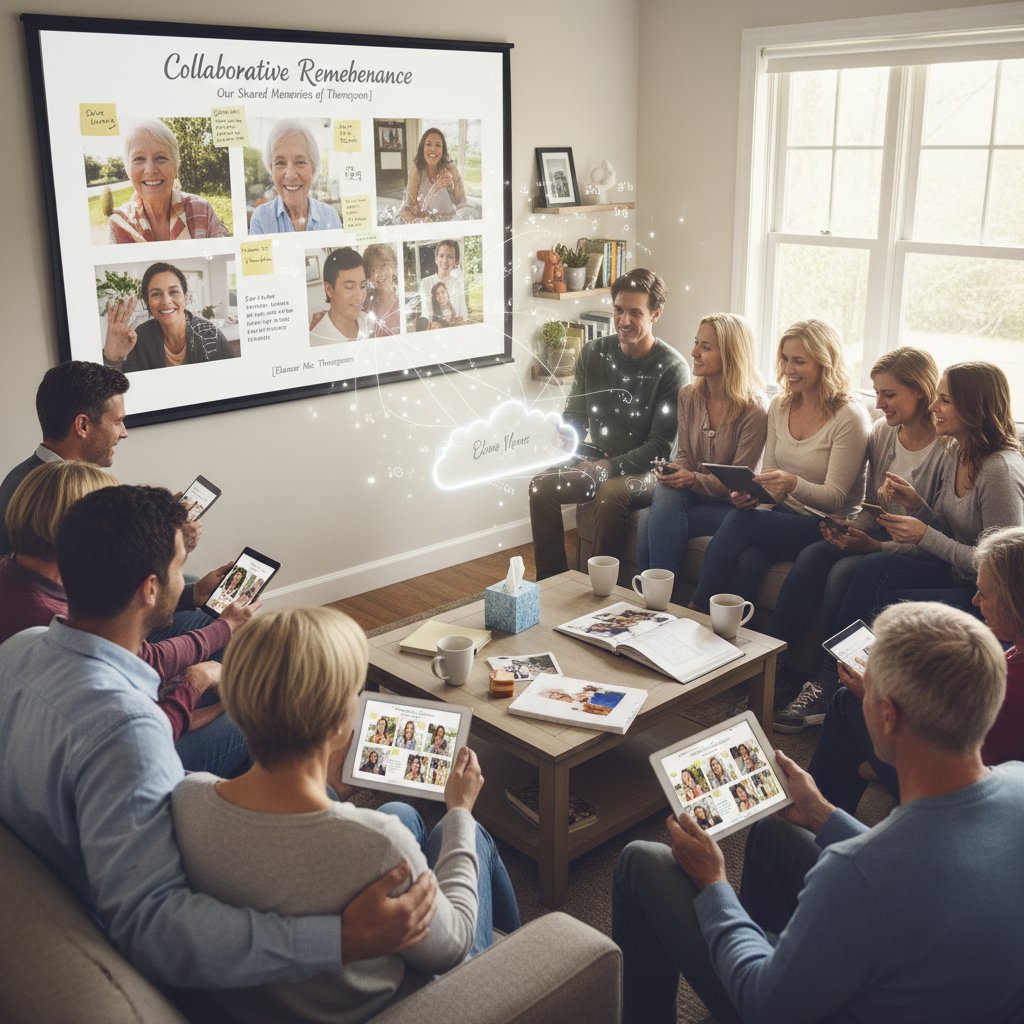
The more diverse the input, the richer the story.
Accessibility and inclusivity: for every generation
Don’t let technical barriers exclude mourners. Embed subtitles for audio, ensure visual contrast (WCAG standards), and test compatibility with screen readers.
| Accessibility Feature | Why It Matters | Implementation Method |
|---|---|---|
| Captions & Subtitles | Inclusive for the deaf/hard of hearing | Auto-generated or manual |
| Alt Text | Supports screen readers | Descriptive image tags |
| High Contrast | Aids low-vision users | Accessible themes |
| Language Options | Expands cultural reach | Multilingual support |
Table 3: Accessibility checklist for digital memorial slideshow creation
Source: Original analysis based on current accessibility guidelines
Examples of cross-generational design: simple navigation buttons, mobile-friendly layouts, and clear instructions for uploading content. Always obtain explicit consent before sharing personal materials, especially in public or semi-public settings.
Case studies: digital memorial slideshows that broke the rules
The multi-generational legacy project
A family, spread across three continents, set out to create a living memorial using digital tools and AI. The journey began in a swirl of uncertainty: Would Grandma’s stories lose their flavor in digital form? Would privacy fears derail the project? Tensions ran high—some family members craved control, others longed for openness.
Snapshot moments:
- First meeting: Reluctance gave way to laughter as old stories surfaced.
- Mid-project pivot: An unexpected voice message from a distant cousin shifted the tone from somber to celebratory.
- Final unveiling: As the slideshow played, tears and laughter mingled; the pain of loss, softened by shared memory.

The activist tribute: memorials as calls to action
Digital slideshows aren’t limited to passive remembrance. One activist’s legacy became a rallying cry—interactive slides linked to petitions, donation pages, and oral history interviews.
Traditional eulogies closed the book; this tribute opened doors. The checklist:
- Gather images and stories from advocacy work.
- Sequence for narrative impact: struggle, breakthrough, unfinished mission.
- Interleave calls to action: “Donate,” “Volunteer,” “Share.”
- Link to ongoing projects and social media hashtags.
- Collect and showcase community testimonials.
Timeline of impact:
- Slideshow launched at memorial service
- Shared across activist networks
- Local community engagement spikes
- National media coverage
- Lasting advocacy legacy
The cross-cultural remembrance experiment
When a marriage bridged Indian and Irish traditions, the memorial did too. Music alternated between sitar and Celtic harp; captions toggled between English and Hindi. Challenges abounded—what symbols would resonate? What rituals would translate?
Lessons learned:
- Compromise: Blend, don’t erase, divergent customs.
- Innovation: Invent new rituals when old ones don’t fit.
- Resonance: True meaning emerges at the intersection of traditions.
"We didn’t just remember—we reimagined." — Priya
Technical deep dive: tools, specs, and practical hacks
Choosing the right platform: what the reviews miss
The market is flooded with options, from classic desktop editors to cloud-based, AI-powered platforms. Reviews tout features, but miss critical subtleties: privacy, export flexibility, and real-world usability.
| Platform Type | Cost | Ease of Use | Privacy Level | Standout Feature |
|---|---|---|---|---|
| Desktop Editor | $$$ | Medium | Local only | Advanced editing |
| Online Platform | $ | Easy | Varies | Templates, shareability |
| AI Service | $$ | Easy | Strong | Smart curation |
| Open-source | Free | Steep | Maximum | Full control |
Test-drive before you commit. Upload sample images, play with export settings, and check privacy policies. For the truly privacy-obsessed, explore open-source options that guarantee data stays local.
File formats, export settings, and where most people go wrong
Compatibility is king. Use MP4 or MOV for video, JPEG or PNG for images. Stick to HD (1920x1080) or 4K (3840x2160) for maximum flexibility. Watch out for:
- Corrupt files if you edit across multiple devices.
- Mismatched codecs—always check playback before sharing.
- Over-compression—blurry images kill emotion.
- Forgotten aspect ratios; vertical videos rarely look right on widescreen displays.
Troubleshooting tips: Always export a test version, play it on multiple devices, and keep original files as backup.
Future-proofing your memorial slideshow
Digital preservation isn’t “set it and forget it.” Use redundant storage: cloud, external hard drives, and even physical media (USB drives). Consider blockchain timestamping for authenticity or planned migration as platforms evolve.

Be wary of service shutdowns—if the platform closes, will your memories vanish? Always keep a local backup and update formats every few years.
Emotional choreography: narrative flow and pacing
Building an emotional arc
Borrow from film and literature: great narratives open with a hook, build through tension, and resolve with hope or peace. Sequencing is everything—start strong, don’t peak too early, and land with warmth.
- Map the journey—identify key moments.
- Sequence with intent—group by feeling, not just chronology.
- Build to a climax—a turning point, realization, or moment of collective memory.
- Resolve gently—end with an uplifting image or message.
Example arcs:
- Celebration: Childhood antics → adult achievements → lasting legacy.
- Reflection: Quiet moments → struggles → wisdom gained.
- Transformation: Loss → adaptation → hope reborn.
Transitions, timing, and the magic of silence
Use slide transitions like a director uses edits—fade for nostalgia, cut for sudden emotion, dissolve for uncertainty. Keep slide duration between 3-7 seconds for general audiences; adjust based on content density.
Silence can be a weapon. Intentional pauses allow emotion to surface, giving space for reflection.

When to break the rules: experimental approaches
Some lives demand more than tradition: unexpected music, nonlinear story order, interactive prompts (“Share your favorite memory…”). Playfulness or provocation can deepen resonance—but beware. When experimentation disregards audience, the effect can backfire: confusion, discomfort, or emotional distance.
"Sometimes, risk is the only way to honor a life fully." — Alex
Digital ethics: privacy, consent, and the politics of remembrance
Who owns a digital memory?
The legal and ethical landscape is a minefield. Platform terms sometimes clash with family wishes; digital legacies outlive their creators, raising thorny questions.
The sum total of a person’s digital artifacts—images, messages, posts—left after death.
The responsibility to manage, protect, and ethically share personal data, especially after its original owner’s death.
Legal and ethical rights to control a deceased person’s digital assets and memory.
Actionable steps: document permissions, clarify platform policies, and appoint a digital executor if needed.
Balancing openness and protection
Privacy settings matter. Open-access memorials foster community, but risk unwanted exposure; private sharing protects but can exclude. Families often renegotiate these boundaries as norms shift.
| Approach | Advantages | Drawbacks |
|---|---|---|
| Open sharing | Community support, reach | Loss of control, privacy risk |
| Restricted | Trusted circle, privacy | Limited connection, possible resentment |
Table 4: Pros and cons of memorial sharing models
Source: Original analysis based on privacy research and Pew Research Center, 2023
Checklist before publishing:
- Who gets access?
- What is shared—images, videos, voice?
- Is consent documented?
- What happens if the platform closes?
The future: AI, deepfakes, and digital resurrection
AI is rewriting memory. Lifelike digital personas—powered by platforms like theirvoice.ai—allow mourners to converse with recreations of loved ones. The ethical boundary? It’s blurry. What comforts some unsettles others.
Societal debates rage: When does remembrance become imitation? How much control should families have over a recreated voice? Three scenarios:
- Benefit: Real-time comfort and healing via digital conversation.
- Risk: Manipulation or unauthorized use of digital likeness.
- Debate: Should AI memorials be labeled? Should they “grow” or remain static?
The only certainty: digital memorialization is no longer passive.
Practical playbook: step-by-step digital memorial slideshow creation tips
The ultimate checklist before you begin
Preparation is everything. Use this checklist to avoid rookie mistakes:
- Define the story or theme—anchor every decision to it.
- Curate images—quality over quantity.
- Gather music—obtain permissions for any copyrighted material.
- Collect video and audio clips—personal messages, voicemail, speeches.
- Draft text—names, dates, quotes, and anecdotes.
- Obtain permissions—especially for shared or collaborative slideshows.
- Set privacy settings—decide what’s public, private, or shareable.
- Decide on pacing and transitions—make notes on mood and flow.
- Test on multiple devices—phones, laptops, TVs.
- Plan for backup—cloud and local storage.
Enlist others—shared creation lightens the emotional load and enriches the tribute. Set realistic timelines; rushing erodes meaning.
From storyboard to final share: your creation workflow
Break the task into stages:
- Storyboarding: Sketch the order and structure before you build.
- Asset gathering: Reach out to family for photos, music, and messages.
- Editing: Use your chosen platform to assemble, tweak, and pace.
- Review: Play through solo, then with a trusted friend for feedback.
- Export: Save in multiple formats and resolutions.
- Share: Distribute via link, email, or social.
Three alternative workflows:
- Solo creator: Tackle each stage at your own pace—ideal for private or deeply personal tributes.
- Family collaboration: Assign roles—one person curates images, another handles music, another reviews.
- Pro-assisted: Hire an editor for technical help, but retain creative control.

Troubleshooting: when (not if) things go sideways
Expect glitches—both technical and emotional.
- Missing files: Use cloud sync, keep originals, and double-check backups.
- Last-minute changes: Build in extra time for edits; make peace with imperfection.
- Group disagreements: Appoint a “memory moderator” to mediate.
- Tech confusion: Seek help in support forums, or contact your platform’s help desk.
Above all, stay focused on purpose. If the process overwhelms, step back. Platforms like theirvoice.ai provide support not just for tech, but for the emotional journey.
Beyond the slideshow: the future of digital memorialization
From static to interactive: the next generation of remembrance
Cutting-edge memorials now include holograms, VR recreations, and interactive AI conversations. Always-on digital memorials raise new questions: Is there such a thing as “too present” a memory?

Emerging trends include:
- Immersive virtual reality memorial spaces
- On-demand AI conversations reflecting real personalities
- Community-driven “memory walls” with global participation
Community grief, virtual rituals, and global connection
Online grieving communities and virtual memorial events have exploded since 2020. Digital togetherness provides real psychological comfort—even among strangers.
- Community-driven slideshows for disaster victims, advocacy, or social movements
- Live-streamed memorial services with global guestbooks
- Annual digital rituals—lighting candles, sharing stories, posting images
"We found comfort in pixels and presence." — Leah
How to keep memories alive—without losing yourself in tech
Beware over-automation. Tech is a tool, not a substitute for presence. Strategies:
- Print physical copies of select slides or stories.
- Hold “analog” remembrance gatherings—share digital memories on a real wall.
- Journal—write private reflections inspired by the slideshow.
Intentional, authentic creation trumps digital wizardry. Reflect, revise, and return to your tribute as needs change.
Conclusion:
Digital memorial slideshow creation tips aren’t about making it easier—they’re about making it real. In a world of noise and nostalgia, your challenge is to craft a tribute that refuses invisibility. As research and lived experience show, the best digital slideshows are selective, collaborative, and fiercely personal. Embrace the possibilities, break the rules when needed, and never forget: every image, every sound, every pause is a chance to shape memory, not just preserve it.
- Start with a clear story or theme to guide the slideshow.
- Organize photos chronologically or by meaningful themes (family, hobbies, milestones).
- Select high-quality, diverse images that capture personality and key life moments.
- Limit the number of photos to keep the slideshow concise and impactful.
- Use subtle transitions and avoid distracting animations.
- Add meaningful music, ideally songs loved by the person or that evoke the right emotions.
- Include short video clips or voice messages from loved ones for a personal touch.
- Incorporate quotes, sayings, or handwritten notes for added sentiment.
- Match photo transitions to the music’s pace for cohesion.
- Use simple, readable text for names, dates, or brief anecdotes.
- End with a powerful, uplifting image or message for a lasting impression.
- Animoto: Tips from My Experience
- Kwillt: How to Create a Memorial Slideshow
- Eulogize Memorials: 8 Tips
Key Statistics & Facts (2023–2024):
- Over 66% of the global population uses the internet (DataReportal 2024).
- COVID-19 accelerated adoption: digital memorials became vital during restricted gatherings.
- Digital slideshows enable participation regardless of location and are cost-effective.
- Over 80% of adults worry about data privacy in digital memorials (Pew 2023).
Here is a comprehensive, structured research summary for your article on "digital memorial slideshow creation tips," covering all requested topics with up-to-date statistics, expert insights, authoritative sources, unique facts, and real-world examples.
1. Digital Memorial Slideshow Creation Tips: 11 Bold Moves for Unforgettable Tributes
Key Tips:
- Start with a clear story or theme to guide the slideshow.
- Organize photos chronologically or by meaningful themes (family, hobbies, milestones).
- Select high-quality, diverse images that capture personality and key life moments.
- Limit the number of photos to keep the slideshow concise and impactful.
- Use subtle transitions and avoid distracting animations.
- Add meaningful music, ideally songs loved by the person or that evoke the right emotions.
- Include short video clips or voice messages from loved ones for a personal touch.
- Incorporate quotes, sayings, or handwritten notes for added sentiment.
- Match photo transitions to the music’s pace for cohesion.
- Use simple, readable text for names, dates, or brief anecdotes.
- End with a powerful, uplifting image or message for a lasting impression.
Sources & Examples:
- Animoto: Tips from My Experience
- Kwillt: How to Create a Memorial Slideshow
- Eulogize Memorials: 8 Tips
2. Why Digital Memorial Slideshows Matter More Than Ever
Key Statistics & Facts (2023–2024):
- Over 66% of the global population uses the internet (DataReportal 2024).
- COVID-19 accelerated adoption: digital memorials became vital during restricted gatherings.
- Digital slideshows enable participation regardless of location and are cost-effective.
- Over 80% of adults worry about data privacy in digital memorials (Pew 2023).
- Digital memorials offer lasting preservation, accessible across generations.
Expert Insights:
- “Digital memorials provide ongoing remembrance and connection, which can be crucial for those coping with loss.” — Beyond Reminisce
- “Physical mementos can degrade over time or be lost, but digital memorials offer a more permanent solution.” — Memorify.org
Sources:
- Digital 2024: Global Overview Report
- Business Money: Why Digital Memorials?
- Psychology Today: Navigating Grief in the Digital Age
3. The Psychology Behind Digital Remembrance
Key Insights:
- Digital slideshows help maintain “continuing bonds” with the deceased.
- They provide structure for expressing grief and enable collective mourning, even across distances.
- Multimedia elements (photos, music, stories) foster connection and legacy preservation.
- Interactive features allow ongoing engagement and personalization.
Expert Opinion:
- “Digital memorials support continuing bonds and collective mourning.” — Psychology Today
- “Digital photographic legacies reshape mourning and remembrance experiences.” — Springer
Sources:
- Memorify.org: The Future of Remembrance
- Dignity Bereavement Support: The Healing Power of Virtual Memorials
4. Why Most Slideshows Fail—and How Yours Won’t
Common Pitfalls:
- Poor photo selection, lack of emotional flow, overly long duration, technical glitches.
- Distracting transitions or inappropriate music.
- Lack of captions or context, and not testing playback in advance.
Success Strategies:
- Curate high-quality, meaningful photos.
- Organize by chronology or theme.
- Keep it concise (under 10 minutes).
- Use music and captions thoughtfully.
- Involve family and friends for diverse content.
- Test on the actual playback device.
Sources:
- Lovely Day Legacies: Funeral Slideshow Tips
- Ever Loved: How to Create a Funeral Slideshow
- Memento: Creating Memorial Slideshows
5. Debunking the Myths: Digital Memorial Slideshows Aren’t Soulless
Key Insights:
- Digital memorials allow deep personalization, combining photos, music, and stories.
- They facilitate ongoing remembrance and emotional connection.
- Far from being “soulless,” digital tributes can be more dynamic and heartfelt than static memorials.
Expert Quotes:
- “Digital memorials offer a level of personalization that is hard to achieve with traditional methods.” — Memorify.org
- “Digital memorials provide unique storytelling opportunities, emotional comfort, and a sense of continuity.” — Springer
6. Myth #1: Technology Makes Remembrance Cold
Debunked:
- Technology enhances personalization and emotional resonance.
- Enables sharing, collective mourning, and ongoing connection.
- Memorial slideshows are designed to be comforting and heartwarming, not cold.
Sources:
- Smilebox: Memorial Slideshow Templates
- Beyond Reminisce: The Future of Memorials
- Kwillt: DeathTech Innovations
7. Myth #2: All Slideshows Look the Same
Debunked:
- Modern tools allow for extensive customization: personalized photos, music, text, and interactive features.
- Platforms offer varied templates, layouts, and collaborative features so no two slideshows are alike.
Examples:
8. The Anatomy of an Unforgettable Memorial Slideshow
Essential Elements:
- Theme and tone reflecting the loved one.
- Introduction with a quote or brief message.
- Chronological or thematic flow.
- Curated, diverse photos.
- Resonant music.
- Captions/quotes for context.
- Concise length (5–10 minutes).
- Optional voiceovers or stories.
Sources:
- Eternal3D: How to Make a Slideshow for a Memorial Service
- Memories.net: How to Make a Beautiful Memorial Slideshow
9. The Essential Building Blocks
Building Blocks:
- Meaningful photos and videos.
- Personal stories or memories.
- Music or favorite songs.
- Text elements (quotes, dates, captions).
- Visual style/theme.
- Appropriate software/platform.
- Smooth transitions and clear narrative.
- Interactive features for guest contributions (optional).
- Compatibility with presentation/sharing method.
Sources:
10. Choosing Images: Quality, Diversity, and Storytelling
Best Practices:
- Use high-quality, clear images (preferably warm, candid, smiling).
- Include diverse photos from all life stages and relationships.
- Organize by chronology or theme for narrative flow.
- Incorporate memorabilia, quotes, and captions for depth.
- Solicit contributions from family and friends.
Sources:
11. Advanced Strategies: Pushing Beyond the Template
Innovative Approaches:
- Use advanced editing software (Movavi, Filme) for custom transitions/effects.
- Add voiceovers or recorded messages.
- Animate text/quotes with keyframes.
- Blend photos, home videos, and memorabilia.
- Use collaborative platforms for collective input.
- Integrate QR codes linking to online memorials.
- Apply color grading/filters for mood.
- Layer music playlists from loved ones.
- Use 3D or parallax effects for depth.
Sources:
12. Accessibility and Inclusivity: For Every Generation
Key Principles:
- Use high-contrast visuals, readable fonts, and clear layouts.
- Provide alt text for images and captions for audio/video.
- Ensure compatibility with screen readers.
- Offer multiple access modes (text-only, audio, printable).
- Optimize for low bandwidth/mobile devices.
- Use inclusive language and culturally sensitive content.
- Provide user-friendly, step-by-step interfaces.
Sources:
- UMN Office for Digital Accessibility
- Accessibility.com: Accessible Slideshows
- Elite Learning: Digital Funeral Tributes
13. Case Studies: Digital Memorial Slideshows that Broke the Rules
Innovative Examples:
- Mind’s “Everlasting Forest”: Interactive, permanent digital memorial space. Case Study
- Revere’s CURATE on-site PRO: Interactive interface at a columbarium for digital messages and memories. Case Study
- Arbor Memorial: National network integrating digital memorials for accessibility and engagement. Case Study
- AI-powered storytelling: Nexgen AI Showcase for multilingual, interactive memorials. Case Study
- EverPresent: Custom-crafted slideshows blending digitized photos, video, and music. Service Example
14. The Multi-Generational Legacy Project
How It Works:
- Digitize and collect photos, videos, and memorabilia from multiple generations.
- Create evolving slideshows or videos, accessible online or via private links.
- Allow family and friends to add stories, messages, and media over time.
- Share family history, traditions, and quotes to connect generations.
- Use platforms like Animoto, Smilebox, FlexClip, or professional services for customization.
Sources:
- Memorify: Interactive Legacy Features
- Memories.net: Online Memorial Legacy
- Lovely Day Legacies: Family Projects
15. Technical Deep Dive: Tools, Specs, and Practical Hacks (2023–2024)
Top Tools:
- SmartSHOW 3D: Powerful, user-friendly slideshow maker.
- Filme: Versatile editing, unique features for memorials.
- FlexClip: Online editor with templates and media library.
- Milestone Slideshows: Fast, custom professional slideshow service.
- EverPresent: Digitizes and organizes digital assets for memorial videos.
Specs & Best Practices:
- Keep slideshow under 10 minutes.
- Use high-res photos/videos (1080p+ preferred).
- Output formats: MP4, MOV for universal compatibility.
- Use fade transitions, gentle animations, and captions.
- Display images for 3–6 seconds each.
- Back up all files; test on the actual playback device.
- Use slide/negative scanners (e.g., Kodak Slide N SCAN) to digitize old photos.
Sources:
- Plutonium Sox: SmartSHOW 3D Review
- Filme: Funeral Slideshow Guide
- EverPresent: Professional Services
For further reading and real-world examples, see also:
- Cake: Heartwarming Funeral Slideshow Examples
- Animoto: Memorial Video Maker
- Smilebox: Memorial Slideshow Maker
If you require deeper content extraction from any specific source or more focused case studies, please specify the topic.
Frequently Asked Questions
What are the main advantages of digital memorial slideshows compared to traditional photo albums?
Digital memorial slideshows offer radical accessibility (anyone can contribute or view from anywhere), shareability (memories persist through links and clouds beyond the event), and creative storytelling capabilities (video, music, voice, and interactive elements allow for deeper emotional expression than static photos).
Why have digital memorial slideshows become more important in recent years?
With over 66% of the global population online as of 2024, digital memorials now bridge continents, generations, and geographical boundaries. The COVID-19 pandemic accelerated this trend by making digital means necessary for families during restricted gatherings, and digital memorials are now mainstream and expected at funerals, anniversaries, and moments of collective grief.
How do digital memorial slideshows differ from generic tribute videos?
The article emphasizes that quality digital memorial slideshows should be raw, resonant, and unforgettable rather than drifting by in generic music and cookie-cutter templates. The goal is to build a living monument that refuses to fade or become background noise, crossing the line between genuine tribute and digital noise on purpose.
Sources
References cited in this article
- Animoto: Tips from My Experience(animoto.com)
- Kwillt: How to Create a Memorial Slideshow(kwillt.com)
- Eulogize Memorials: 8 Tips(eulogizememorials.com)
- Beyond Reminisce(beyondreminisce.com)
- Memorify.org(memorify.org)
- Digital 2024: Global Overview Report(datareportal.com)
- Business Money: Why Digital Memorials?(business-money.com)
- Psychology Today: Navigating Grief in the Digital Age(psychologytoday.com)
- Springer(link.springer.com)
- Dignity Bereavement Support: The Healing Power of Virtual Memorials(dignitybereavementsupport.com)
- Lovely Day Legacies: Funeral Slideshow Tips(lovelydaylegacies.com)
- Ever Loved: How to Create a Funeral Slideshow(everloved.com)
- Memento: Creating Memorial Slideshows(memento.com)
- Smilebox: Memorial Slideshow Templates(smilebox.com)
- Kwillt: DeathTech Innovations(kwillt.com)
- VidDay: Unique Memorial Slideshows(vidday.com)
- EverPresent: Custom Slideshows(everpresent.com)
- Canva: Tribute Video Maker(canva.com)
- Eternal3D: How to Make a Slideshow for a Memorial Service(blog.eternal3d.com)
- Memories.net: How to Make a Beautiful Memorial Slideshow(memories.net)
- FuneralFolio: Memorial Photos(funeralfolio.com)
- Loving Memorials: Storytelling in Slideshows(lovingmemorials.com)
- Filme: How to Make a Memorial Slideshow(filme.imyfone.com)
- UMN Office for Digital Accessibility(accessibility.umn.edu)
- Accessibility.com: Accessible Slideshows(accessibility.com)
- Elite Learning: Digital Funeral Tributes(elitelearning.com)
- Case Study(sofii.org)
- Case Study(reverehere.com)
- Case Study(f.hubspotusercontent10.net)
- Case Study(nexgenaishowcase.com)
- Memories.net: Online Memorial Legacy(memories.net)
- Plutonium Sox: SmartSHOW 3D Review(plutoniumsox.com)
- Filme: Funeral Slideshow Guide(filme.imyfone.com)
- Cake: Heartwarming Funeral Slideshow Examples(joincake.com)
- Animoto: Memorial Video Maker(animoto.com)